System Diagrams
Vista IoT System Diagrams & Architecture
Comprehensive visual documentation of the Vista IoT Gateway Platform architecture, data flows, and system components.

🏗️ Complete System Architecture
Full Industrial IoT Gateway Overview
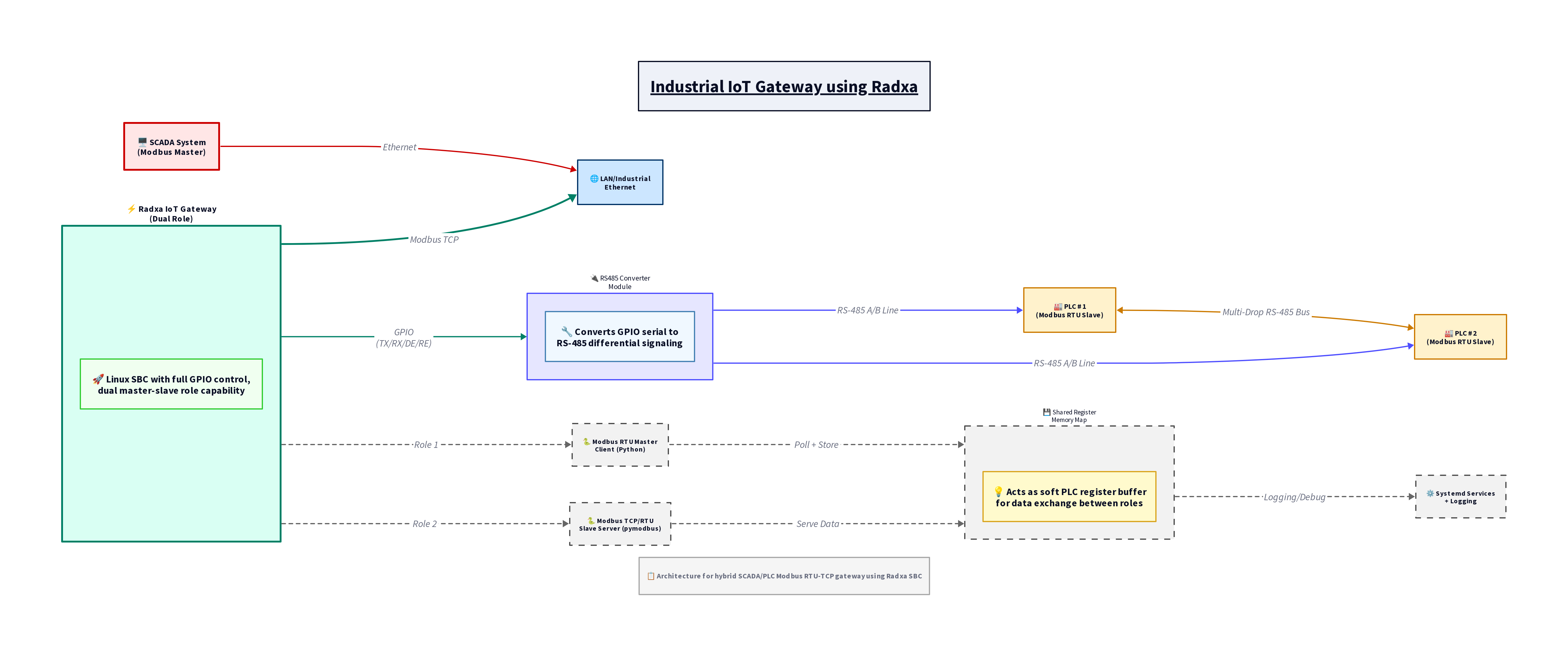
Complete end-to-end architecture showing all components from field devices to cloud platforms, including protocol conversions, data processing, and system management layers.
Compact System Overview
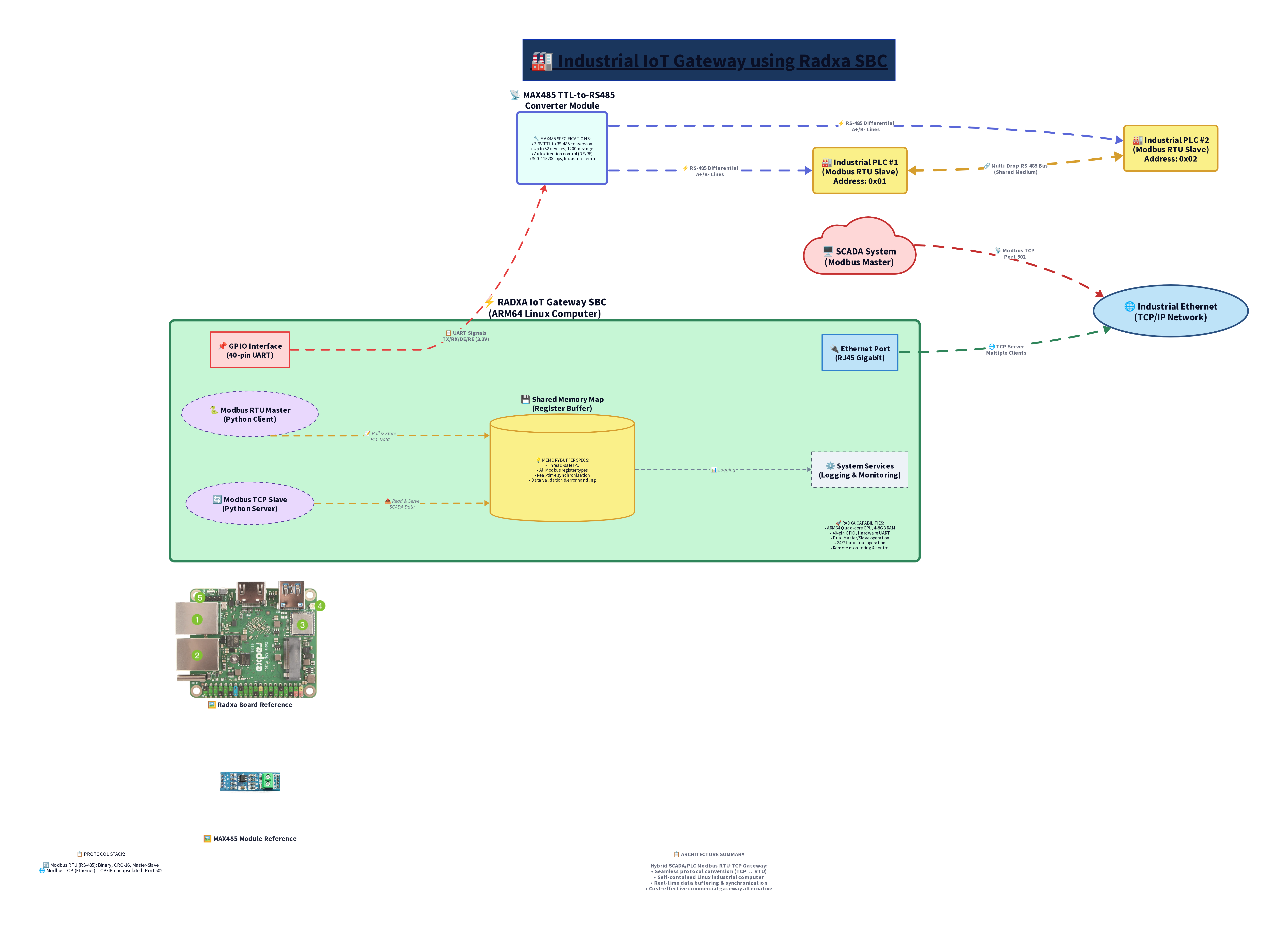
Simplified architectural view highlighting the core gateway functionality and primary data flow paths for quick understanding.
🔄 Interactive System Flow Diagrams
Overall System Architecture with Data Flow
graph TB
    subgraph "Field Level - Industrial Equipment"
        PLC1[PLC Controller<br/>Modbus TCP]
        PLC2[PLC Controller<br/>Modbus RTU]
        IED1[Intelligent Electronic Device<br/>IEC 61850]
        RTU1[Remote Terminal Unit<br/>DNP3]
        HMI1[Human Machine Interface<br/>OPC-UA]
        Sensor1[IoT Sensors<br/>MQTT]
    end

    subgraph "Vista IoT Gateway Platform"
        subgraph "Web Management Layer"
            WebUI[Web Dashboard<br/>Next.js + TypeScript]
            API[REST API<br/>Flask + Socket.IO]
        end

        subgraph "Configuration Engine"
            ConfigManager[YAML Configuration Manager]
            SystemConfig[System Configurator]
            NetworkConfig[Network Manager]
        end

        subgraph "Protocol Conversion Layer"
            ModbusHandler[Modbus Handler<br/>TCP/RTU]
            OPCUAHandler[OPC-UA Handler<br/>Client/Server]
            DNP3Handler[DNP3 Handler<br/>Master/Outstation]
            IECHandler[IEC 61850 Handler<br/>MMS/GOOSE]
            MQTTBroker[Internal MQTT Broker<br/>Mosquitto]
        end

        subgraph "Data Processing Layer"
            DataNormalizer[Data Normalizer]
            DataValidator[Data Validator]
            LocalStorage[Local Storage<br/>SQLite/InfluxDB]
            RealTimeEngine[Real-time Engine]
        end

        subgraph "System Services"
            NetworkManager[Network Manager]
            SecurityManager[Security Manager]
            LogManager[Log Manager]
            BackupManager[Backup Manager]
        end
    end

    subgraph "Cloud & Enterprise Integration"
        AWSIOT[AWS IoT Core]
        AzureIOT[Azure IoT Hub]
        GoogleIOT[Google Cloud IoT]
        PrivateCloud[Private Cloud<br/>MQTT/HTTP]
        SCADA[SCADA System<br/>OPC-UA]
        ERP[ERP System<br/>REST API]
    end

    %% Field Device Connections
    PLC1 -->|Modbus TCP Port 502| ModbusHandler
    PLC2 -->|Modbus RTU Serial| ModbusHandler
    IED1 -->|IEC 61850 Port 102| IECHandler
    RTU1 -->|DNP3 Port 20000| DNP3Handler
    HMI1 -->|OPC-UA Port 4840| OPCUAHandler
    Sensor1 -->|MQTT Port 1883| MQTTBroker

    %% Internal Gateway Connections
    WebUI <--> API
    API <--> ConfigManager
    ConfigManager --> SystemConfig
    ConfigManager --> NetworkConfig

    ModbusHandler --> DataNormalizer
    OPCUAHandler --> DataNormalizer
    DNP3Handler --> DataNormalizer
    IECHandler --> DataNormalizer
    MQTTBroker --> DataNormalizer

    DataNormalizer --> DataValidator
    DataValidator --> LocalStorage
    DataValidator --> RealTimeEngine
    RealTimeEngine --> MQTTBroker

    %% Cloud Connections
    MQTTBroker -->|MQTT/TLS| AWSIOT
    MQTTBroker -->|MQTT/TLS| AzureIOT
    MQTTBroker -->|MQTT/TLS| GoogleIOT
    MQTTBroker -->|MQTT/TCP| PrivateCloud
    OPCUAHandler -->|OPC-UA| SCADA
    API -->|REST API| ERP

    %% Styling
    style WebUI fill:#e1f5fe,stroke:#01579b,stroke-width:2px
    style MQTTBroker fill:#f3e5f5,stroke:#4a148c,stroke-width:2px
    style DataNormalizer fill:#e8f5e8,stroke:#1b5e20,stroke-width:2px
    style LocalStorage fill:#fff3e0,stroke:#e65100,stroke-width:2px
Protocol Communication Matrix
graph LR
    subgraph "Industrial Protocols"
        MODBUS[Modbus TCP/RTU<br/>Port 502]
        OPCUA[OPC-UA<br/>Port 4840]
        DNP3[DNP3<br/>Port 20000]
        IEC61850[IEC 61850<br/>Port 102]
        MQTT[MQTT<br/>Port 1883]
    end

    subgraph "Vista IoT Gateway Core"
        CONVERTER[Protocol Converter]
        NORMALIZER[Data Normalizer]
        VALIDATOR[Data Validator]
    end

    subgraph "Unified Output"
        JSON[Normalized JSON]
        MQTT_OUT[MQTT Publisher]
        API_OUT[REST API]
    end

    subgraph "Cloud Destinations"
        AWS[AWS IoT]
        AZURE[Azure IoT]
        PRIVATE[Private Cloud]
        ANALYTICS[Analytics Platform]
    end

    %% Protocol to Converter
    MODBUS --> CONVERTER
    OPCUA --> CONVERTER
    DNP3 --> CONVERTER
    IEC61850 --> CONVERTER
    MQTT --> CONVERTER

    %% Internal Processing
    CONVERTER --> NORMALIZER
    NORMALIZER --> VALIDATOR
    VALIDATOR --> JSON

    %% Output Distribution
    JSON --> MQTT_OUT
    JSON --> API_OUT

    %% Cloud Distribution
    MQTT_OUT --> AWS
    MQTT_OUT --> AZURE
    MQTT_OUT --> PRIVATE
    API_OUT --> ANALYTICS

    style CONVERTER fill:#ffecb3,stroke:#ff8f00,stroke-width:3px
    style NORMALIZER fill:#e8f5e8,stroke:#2e7d32,stroke-width:2px
    style JSON fill:#e3f2fd,stroke:#1565c0,stroke-width:2px
Real-time Data Processing Pipeline
sequenceDiagram
    participant Device as Industrial Device
    participant Gateway as Vista IoT Gateway
    participant Protocol as Protocol Handler
    participant Processor as Data Processor
    participant MQTT as MQTT Broker
    participant Cloud as Cloud Platform
    participant Dashboard as Web Dashboard

    Note over Device,Dashboard: Real-time Data Flow Sequence

    Device->>Gateway: Raw Protocol Data
    activate Gateway

    Gateway->>Protocol: Parse Protocol
    activate Protocol
    Protocol->>Protocol: Validate Message
    Protocol->>Processor: Structured Data
    deactivate Protocol

    activate Processor
    Processor->>Processor: Normalize Format
    Processor->>Processor: Validate Range
    Processor->>Processor: Add Metadata
    Processor->>MQTT: JSON Payload
    deactivate Processor

    activate MQTT
    MQTT->>Cloud: Telemetry Data
    MQTT->>Dashboard: Real-time Update
    deactivate MQTT

    activate Cloud
    Cloud->>Cloud: Store & Process
    deactivate Cloud

    activate Dashboard
    Dashboard->>Dashboard: Update UI
    deactivate Dashboard

    deactivate Gateway

    Note over Device,Dashboard: Typical Processing Time: < 50ms
Network Topology & Security Architecture
graph TB
    subgraph "Corporate Network (VLAN 10)"
        Internet[Internet Gateway]
        Corp_Router[Corporate Router]
        Corp_Switch[Management Switch]
        Admin_PC[Admin Workstation]
        Corp_Server[Corporate Servers]
    end

    subgraph "DMZ (VLAN 30)"
        Firewall[Enterprise Firewall]
        VPN_Server[VPN Server]
        DNS_Server[DNS Server]
    end

    subgraph "Industrial Network (VLAN 20)"
        Ind_Switch[Industrial Switch<br/>Managed]

        subgraph "Vista IoT Gateway Cluster"
            Gateway_Primary[Primary Gateway<br/>192.168.20.100]
            Gateway_Backup[Backup Gateway<br/>192.168.20.101]
        end

        subgraph "Field Devices"
            PLC_1[PLC Station 1<br/>192.168.20.10]
            PLC_2[PLC Station 2<br/>192.168.20.11]
            HMI_Panel[HMI Panel<br/>192.168.20.15]
            IED_Device[Power IED<br/>192.168.20.20]
            RTU_Remote[Remote RTU<br/>192.168.20.25]
        end
    end

    subgraph "Wireless Network (VLAN 40)"
        WiFi_AP[Industrial WiFi AP]
        Mobile_HMI[Mobile HMI Tablet]
        Portable_Scanner[Portable Scanner]
    end

    %% Network Connections
    Internet --> Corp_Router
    Corp_Router --> Corp_Switch
    Corp_Router --> Firewall
    Corp_Switch --> Admin_PC
    Corp_Switch --> Corp_Server

    Firewall --> VPN_Server
    Firewall --> DNS_Server
    Firewall --> Ind_Switch

    Ind_Switch --> Gateway_Primary
    Ind_Switch --> Gateway_Backup
    Ind_Switch --> PLC_1
    Ind_Switch --> PLC_2
    Ind_Switch --> HMI_Panel
    Ind_Switch --> IED_Device
    Ind_Switch --> RTU_Remote
    Ind_Switch --> WiFi_AP

    WiFi_AP -.->|WiFi| Mobile_HMI
    WiFi_AP -.->|WiFi| Portable_Scanner

    %% Security Zones
    Gateway_Primary --> Gateway_Backup

    %% Styling
    style Gateway_Primary fill:#4caf50,stroke:#2e7d32,stroke-width:4px,color:#fff
    style Gateway_Backup fill:#ff9800,stroke:#f57c00,stroke-width:3px,color:#fff
    style Firewall fill:#f44336,stroke:#c62828,stroke-width:3px,color:#fff
    style Ind_Switch fill:#2196f3,stroke:#1565c0,stroke-width:2px,color:#fff

    classDef fieldDevice fill:#e8eaf6,stroke:#3f51b5,stroke-width:2px
    class PLC_1,PLC_2,HMI_Panel,IED_Device,RTU_Remote fieldDevice
Configuration Management Workflow
flowchart TD
    Start([User Accesses Dashboard]) --> Auth{Authentication}
    Auth -->|Success| Dashboard[Load Dashboard]
    Auth -->|Fail| Login[Login Screen]
    Login --> Auth

    Dashboard --> ConfigTab[Navigate to Configuration]
    ConfigTab --> LoadConfig[Load Current Config]
    LoadConfig --> FormDisplay[Display Configuration Form]

    FormDisplay --> UserInput[User Modifies Settings]
    UserInput --> ClientValidation[Client-side Validation]

    ClientValidation -->|Invalid| ErrorDisplay[Show Validation Errors]
    ErrorDisplay --> UserInput

    ClientValidation -->|Valid| GenerateYAML[Generate YAML Config]
    GenerateYAML --> ServerValidation[Server-side Validation]

    ServerValidation -->|Invalid| ServerError[Show Server Errors]
    ServerError --> UserInput

    ServerValidation -->|Valid| CreateBackup[Create Configuration Backup]
    CreateBackup --> ApplyNetwork[Apply Network Configuration]

    ApplyNetwork --> ApplyProtocols[Configure Protocols]
    ApplyProtocols --> ApplySystem[Apply System Settings]
    ApplySystem --> UpdateFirewall[Update Firewall Rules]

    UpdateFirewall --> RestartServices[Restart Required Services]
    RestartServices --> VerifyConfig[Verify Configuration]

    VerifyConfig -->|Success| Complete[Configuration Complete]
    VerifyConfig -->|Failure| Rollback[Rollback to Previous Config]

    Rollback --> RestoreBackup[Restore from Backup]
    RestoreBackup --> NotifyError[Notify User of Failure]
    NotifyError --> FormDisplay

    Complete --> UpdateStatus[Update System Status]
    UpdateStatus --> End([Configuration Applied])

    %% Styling
    style Start fill:#e8f5e8,stroke:#4caf50,stroke-width:2px
    style Complete fill:#e8f5e8,stroke:#4caf50,stroke-width:2px
    style End fill:#e8f5e8,stroke:#4caf50,stroke-width:2px
    style ErrorDisplay fill:#ffebee,stroke:#f44336,stroke-width:2px
    style ServerError fill:#ffebee,stroke:#f44336,stroke-width:2px
    style Rollback fill:#fff3e0,stroke:#ff9800,stroke-width:2px
Security Implementation Architecture
graph TB
    subgraph "External Threats"
        Hacker[External Attackers]
        Malware[Malware/Viruses]
        Phishing[Phishing Attempts]
        DDoS[DDoS Attacks]
    end

    subgraph "Perimeter Security"
        WAF[Web Application Firewall]
        NetworkFW[Network Firewall]
        IDS[Intrusion Detection]
        VPN[VPN Gateway]
    end

    subgraph "Vista IoT Gateway Security"
        subgraph "Authentication Layer"
            WebAuth[Web Authentication]
            CertAuth[Certificate Authentication]
            TokenAuth[API Token Authentication]
        end

        subgraph "Transport Security"
            TLS[TLS/SSL Encryption]
            MTLS[Mutual TLS]
            VPN_Client[VPN Client]
        end

        subgraph "Protocol Security"
            MQTT_Auth[MQTT Authentication]
            OPCUA_Security[OPC-UA Security Policy]
            Modbus_Security[Modbus Security]
        end

        subgraph "System Security"
            FilePerms[File Permissions]
            ServiceIsolation[Service Isolation]
            ProcessMonitoring[Process Monitoring]
            LogAuditing[Security Log Auditing]
        end

        subgraph "Data Security"
            EncryptionAtRest[Encryption at Rest]
            DataValidation[Input Validation]
            AccessControl[Role-based Access]
            BackupEncryption[Backup Encryption]
        end
    end

    subgraph "Internal Network"
        AdminAccess[Administrative Access]
        FieldDevices[Field Device Network]
        MonitoringTools[Monitoring Tools]
    end

    %% Threat Flow (Blocked)
    Hacker -.->|Blocked| WAF
    Malware -.->|Blocked| NetworkFW
    Phishing -.->|Detected| IDS
    DDoS -.->|Filtered| NetworkFW

    %% Legitimate Access Flow
    AdminAccess -->|Secure Channel| VPN
    VPN --> WebAuth
    VPN --> VPN_Client

    WebAuth --> TLS
    CertAuth --> MTLS
    TokenAuth --> TLS

    TLS --> MQTT_Auth
    TLS --> OPCUA_Security
    TLS --> Modbus_Security

    FieldDevices --> OPCUA_Security
    FieldDevices --> MQTT_Auth
    FieldDevices --> Modbus_Security

    %% Internal Security
    MQTT_Auth --> ServiceIsolation
    OPCUA_Security --> ServiceIsolation
    Modbus_Security --> ServiceIsolation

    ServiceIsolation --> ProcessMonitoring
    ProcessMonitoring --> LogAuditing
    LogAuditing --> AccessControl
    AccessControl --> EncryptionAtRest

    %% Monitoring Integration
    LogAuditing --> MonitoringTools
    ProcessMonitoring --> MonitoringTools

    %% Styling
    style WAF fill:#f44336,stroke:#c62828,stroke-width:3px,color:#fff
    style NetworkFW fill:#f44336,stroke:#c62828,stroke-width:3px,color:#fff
    style TLS fill:#4caf50,stroke:#2e7d32,stroke-width:3px,color:#fff
    style WebAuth fill:#2196f3,stroke:#1565c0,stroke-width:2px,color:#fff
    style ServiceIsolation fill:#ff9800,stroke:#f57c00,stroke-width:2px,color:#fff
📊 Performance Monitoring Dashboard
System Metrics Flow
graph LR
    subgraph "System Metrics Collection"
        CPU[CPU Usage]
        Memory[Memory Usage]
        Disk[Disk I/O]
        Network[Network Traffic]
        Temperature[System Temperature]
    end

    subgraph "Protocol Metrics"
        MQTT_Metrics[MQTT Messages/sec]
        Modbus_Metrics[Modbus Polls/sec]
        OPCUA_Metrics[OPC-UA Subscriptions]
        API_Metrics[API Requests/sec]
    end

    subgraph "Data Processing"
        Collector[Metrics Collector]
        Aggregator[Data Aggregator]
        Analyzer[Performance Analyzer]
    end

    subgraph "Visualization"
        Dashboard[Real-time Dashboard]
        Alerts[Alert System]
        Reports[Performance Reports]
        Trends[Trend Analysis]
    end

    %% Metrics Flow
    CPU --> Collector
    Memory --> Collector
    Disk --> Collector
    Network --> Collector
    Temperature --> Collector

    MQTT_Metrics --> Collector
    Modbus_Metrics --> Collector
    OPCUA_Metrics --> Collector
    API_Metrics --> Collector

    Collector --> Aggregator
    Aggregator --> Analyzer

    Analyzer --> Dashboard
    Analyzer --> Alerts
    Analyzer --> Reports
    Analyzer --> Trends

    style Collector fill:#e3f2fd,stroke:#1565c0,stroke-width:2px
    style Dashboard fill:#e8f5e8,stroke:#2e7d32,stroke-width:2px
    style Alerts fill:#fff3e0,stroke:#f57c00,stroke-width:2px
🔧 Hardware Integration Diagrams
Radxa Cubie A5E Integration
graph TB
    subgraph "Radxa Cubie A5E Hardware"
        CPU[8-core ARM Cortex-A55<br/>Quad 1.8GHz + Quad 1.4GHz]
        MCU[RISC-V MCU<br/>200MHz RTOS]
        GPU[ARM G57 MC1<br/>4K Video]
        NPU[NPU 2 TOPS<br/>AI Processing]

        Memory[4GB LPDDR4x]
        Storage[32GB eMMC<br/>+ M.2 Slot]

        Ethernet1[GbE Port 1<br/>PoE Capable]
        Ethernet2[GbE Port 2]
        WiFi[WiFi 6 + BT 5.4]

        USB[4x USB 3.0<br/>1x USB-C]
        GPIO[40-pin Header]
        HDMI[HDMI 2.0 4K]
    end

    subgraph "Vista IoT Software Stack"
        OS[Debian 12 Linux]
        Runtime[Python 3.11 Runtime]
        WebServer[Flask + Gunicorn]
        Frontend[Next.js Dashboard]
        Protocols[Protocol Handlers]
        Database[SQLite + InfluxDB]
    end

    subgraph "External Connections"
        PoE_Switch[PoE Switch]
        Industrial_Network[Industrial Network]
        Cloud_Services[Cloud Services]
        Display[External Display]
        Storage_Expansion[External Storage]
    end

    %% Hardware to Software
    CPU --> OS
    MCU --> OS
    Memory --> Runtime
    Storage --> Database

    %% Software Stack
    OS --> Runtime
    Runtime --> WebServer
    Runtime --> Protocols
    WebServer --> Frontend

    %% External Connections
    Ethernet1 --> PoE_Switch
    Ethernet2 --> Industrial_Network
    WiFi --> Cloud_Services
    HDMI --> Display
    USB --> Storage_Expansion

    PoE_Switch --> Industrial_Network

    style CPU fill:#ff9800,stroke:#f57c00,stroke-width:3px,color:#fff
    style MCU fill:#4caf50,stroke:#2e7d32,stroke-width:2px,color:#fff
    style OS fill:#2196f3,stroke:#1565c0,stroke-width:2px,color:#fff
    style Frontend fill:#9c27b0,stroke:#6a1b9a,stroke-width:2px,color:#fff
📋 Quick Reference
Port Allocation Table
| Service | Port | Protocol | Purpose |
|---|---|---|---|
| Web Dashboard | 8080 | HTTP/HTTPS | Main configuration interface |
| MQTT Broker | 1883 | MQTT | Internal message broker |
| MQTT Secure | 8883 | MQTTS | Secure MQTT with TLS |
| Modbus TCP | 502 | Modbus | Industrial device communication |
| OPC-UA | 4840 | OPC-UA | Industrial automation protocol |
| DNP3 | 20000 | DNP3 | SCADA communication |
| IEC 61850 | 102 | IEC61850 | Power system communication |
| SSH Management | 22 | SSH | System administration |
| HTTP API | 8080 | HTTP | REST API endpoints |
| WebSocket | 8080 | WS | Real-time updates |
Configuration File Hierarchy
/opt/vista-iot-gateway/
├── config/
│   ├── gateway.yaml           # Main configuration
│   ├── protocols/
│   │   ├── modbus.json       # Modbus settings
│   │   ├── opcua.json        # OPC-UA settings
│   │   ├── dnp3.json         # DNP3 settings
│   │   └── iec61850.json     # IEC 61850 settings
│   ├── network/
│   │   ├── ethernet.conf     # Ethernet configuration
│   │   ├── wifi.conf         # WiFi configuration
│   │   └── firewall.rules    # Firewall rules
│   └── security/
│       ├── certificates/     # SSL certificates
│       ├── keys/            # Private keys
│       └── users.json       # User accounts
├── data/
│   ├── sqlite/              # Local database files
│   ├── influxdb/           # Time-series data
│   └── logs/               # Application logs
└── backups/
    ├── daily/              # Daily configuration backups
    ├── weekly/             # Weekly system backups
    └── manual/             # Manual backup snapshots
🎯 Next Steps: Explore our Hardware Guide for detailed board specifications or check the API Reference for integration examples.