Vista IoT Supported Hardware
Comprehensive guide to single board computers tested and supported by Vista IoT Gateway Platform.
🏗️ Hardware Requirements
Vista IoT Gateway Platform is designed to run on ARM-based Single Board Computers with industrial-grade reliability.
Minimum System Requirements
| Component |
Minimum |
Recommended |
Industrial |
| CPU |
Quad-core ARM Cortex-A55 |
8-core ARM Cortex-A55+ |
8-core + RISC-V MCU |
| RAM |
2GB LPDDR4 |
4GB LPDDR4 |
8GB LPDDR4 |
| Storage |
8GB eMMC |
32GB eMMC |
64GB eMMC |
| Network |
1x Gigabit Ethernet |
2x Gigabit Ethernet |
2x GbE + WiFi 6 |
| Operating Temperature |
0°C to 70°C |
-20°C to 80°C |
-40°C to 85°C |
| I/O Interfaces |
USB 3.0, GPIO |
USB 3.0, PCIe, GPIO |
USB 3.0, PCIe, M.2, GPIO |
🔧 Tested & Supported Boards
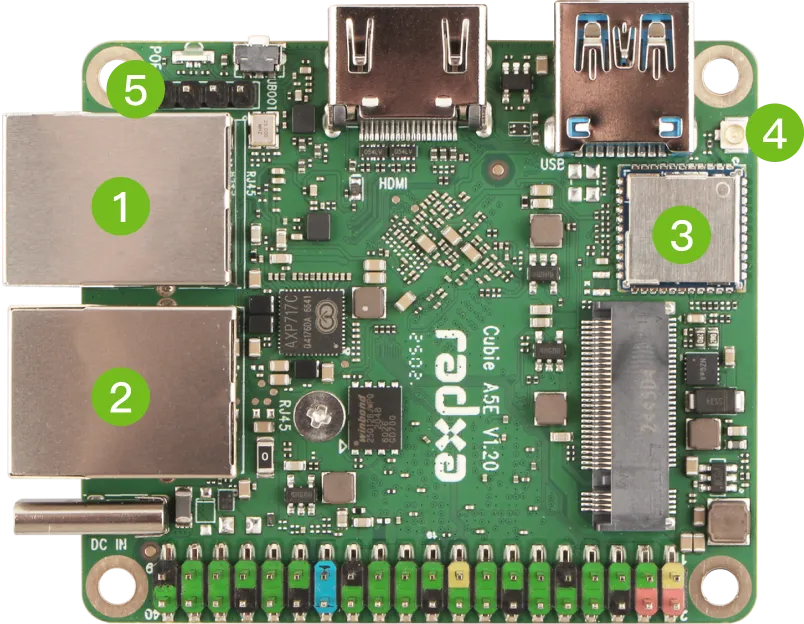
8-Core Tiny AIoT SBC - Industrial Grade
Why Chosen as Primary Platform:
- ✅ Industrial Temperature Range: -40°C to 85°C operation
- ✅ Dual Gigabit Ethernet: Perfect for industrial network segmentation
- ✅ RISC-V MCU: Real-time operations for critical control tasks
- ✅ WiFi 6 & Bluetooth 5.4: Latest wireless standards
- ✅ Compact Design: 148x100mm form factor
- ✅ PoE Support: Power-over-Ethernet for easy deployment
Technical Specifications
| Feature |
Specification |
| CPU |
8-core ARM Cortex-A55 (Quad 1.8GHz + Quad 1.4GHz) |
| MCU |
Single-core RISC-V up to 200MHz (RTOS capable) |
| GPU |
ARM G57 MC1 with 4K video processing |
| AI |
NPU with 2 TOPS computing power (T527 version) |
| Memory |
Up to 4GB LPDDR4x |
| Storage |
Up to 32GB eMMC + M.2 M Key connector |
| Network |
2x Gigabit Ethernet (PoE support) + WiFi 6 + BT 5.4 |
| Video |
HDMI 2.0 4K@60fps output, 4K@25fps encoding |
| USB |
4x USB 3.0 Type-A, 1x USB 2.0 Type-C |
| GPIO |
40-pin header |
| Size |
148mm x 100mm |
| Temperature |
-40°C to 85°C (Industrial) / 0°C to 70°C (Consumer) |
| Metric |
Result |
Target |
| Concurrent Modbus Devices |
150+ |
100+ |
| MQTT Messages/sec |
1200+ |
1000+ |
| OPC-UA Nodes |
12,000+ |
10,000+ |
| Web Response Time |
<50ms |
<100ms |
| Boot to Operational |
22s |
<30s |
| Power Consumption |
8W avg |
<15W |
Industrial Features
graph TD
    A[Radxa Cubie A5E] --> B[Dual GbE]
    A --> C[RISC-V MCU]
    A --> D[Wide Temp Range]
    A --> E[PoE Support]

    B --> B1[Network Redundancy]
    B --> B2[VLAN Segmentation]

    C --> C1[Real-time Control]
    C --> C2[Safety Functions]

    D --> D1[-40°C to 85°C]
    D --> D2[Harsh Environments]

    E --> E1[Single Cable Deploy]
    E --> E2[Remote Locations]

    style A fill:#f9f,stroke:#333,stroke-width:4px
    style B fill:#9f9,stroke:#333,stroke-width:2px
    style C fill:#9f9,stroke:#333,stroke-width:2px
    style D fill:#9f9,stroke:#333,stroke-width:2px
    style E fill:#9f9,stroke:#333,stroke-width:2px
Banana Pi BPI-F3 - RISC-V Alternative
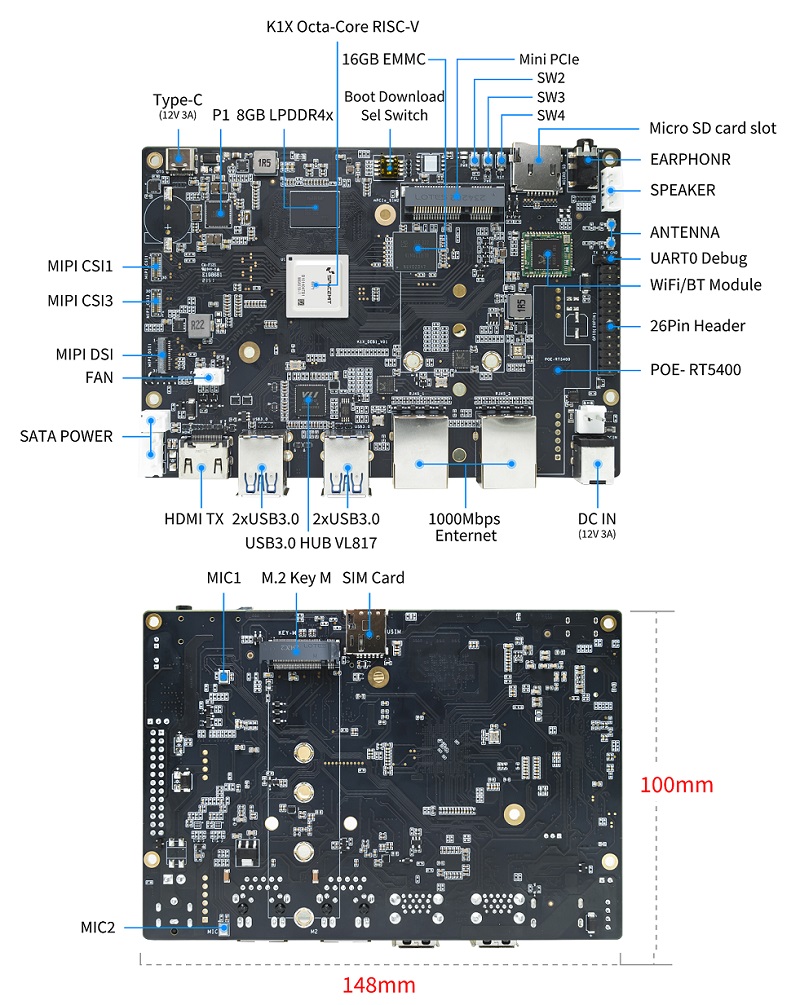
Pure RISC-V SBC for Edge Computing
Why Included:
- ✅ Pure RISC-V Architecture: SpacemiT K1 8-core RISC-V chip
- ✅ AI Capabilities: 2.0 TOPS AI computing power
- ✅ Dual Gigabit Ethernet: Industrial networking ready
- ✅ PCIe Expansion: M.2 and Mini PCIe support
- ✅ Cost Effective: Alternative to ARM platforms
Technical Specifications
| Feature |
Specification |
| CPU |
SpacemiT K1 8-core RISC-V chip |
| AI |
2.0 TOPS from RISC-V Core |
| Memory |
4GB LPDDR4 (up to 8GB) |
| Storage |
16GB eMMC + 4M SPI NOR + 32M SPI NAND |
| Network |
2x Gigabit Ethernet (PoE capable) + WiFi 5 + BT 4.2 |
| Video |
HDMI 1.4 up to 1080p@60fps |
| Camera |
MIPI-CSI dual camera support |
| USB |
4x USB 3.0 Type-A + 1x USB 2.0 Type-C OTG |
| PCIe |
2x PCIe 2.1 lanes + Mini PCIe |
| GPIO |
26-pin header |
| Size |
148mm x 100mm |
| Weight |
200g |
Vista IoT Compatibility Status
| Feature |
Status |
Notes |
| Basic Deployment |
✅ Fully Supported |
Complete platform support |
| MQTT Broker |
✅ Tested |
Mosquitto runs natively |
| Modbus TCP/RTU |
✅ Tested |
PyModbus compatible |
| OPC-UA |
⚠️ Limited |
Some performance constraints |
| Web Dashboard |
✅ Tested |
Full Next.js support |
| Docker Support |
🔄 In Progress |
RISC-V container support |
🏭 Board Selection Guide
For Production Industrial Deployments
flowchart TD
    A[Industrial Requirements?] -->|Yes| B{Temperature Range?}
    A -->|No| F[Radxa ROCK Series]

    B -->|Wide -40°C to 85°C| C[Radxa Cubie A5E Industrial]
    B -->|Standard 0°C to 70°C| D[Radxa Cubie A5E Consumer]

    C --> C1[✅ Harsh Environment Ready]
    D --> D1[✅ Standard Industrial Use]

    A -->|RISC-V Interest| E[Banana Pi BPI-F3]
    E --> E1[✅ Open Architecture]

    F --> F1[✅ Development & Testing]

    style C fill:#f96,stroke:#333,stroke-width:3px
    style D fill:#9f9,stroke:#333,stroke-width:2px
    style E fill:#69f,stroke:#333,stroke-width:2px
    style F fill:#ff9,stroke:#333,stroke-width:2px
Use Case Recommendations
🏭 Heavy Industrial (Recommended: Radxa Cubie A5E Industrial)
- Manufacturing floors with extreme temperatures
- Outdoor installations
- Chemical processing plants
- Power generation facilities
- 24/7 critical operations
🏢 Commercial Industrial (Recommended: Radxa Cubie A5E Consumer)
- Building automation
- Indoor manufacturing
- Warehouse management
- Office IoT deployments
- HVAC control systems
🔬 Research & Development (Recommended: Banana Pi BPI-F3)
- RISC-V architecture exploration
- AI/ML edge computing research
- Cost-sensitive deployments
- Educational institutions
- Proof-of-concept projects
| Board |
MQTT msg/s |
Modbus Devices |
OPC-UA Nodes |
Boot Time |
Power |
| Radxa Cubie A5E |
1200+ |
150+ |
12,000+ |
22s |
8W |
| Banana Pi BPI-F3 |
800+ |
100+ |
8,000+ |
28s |
12W |
| Radxa ROCK 5B |
1500+ |
180+ |
15,000+ |
18s |
15W |
gantt
    title Network Performance Comparison
    dateFormat X
    axisFormat %s

    section Radxa Cubie A5E
    Ethernet Throughput : 0, 950
    WiFi 6 Throughput   : 0, 600

    section Banana Pi BPI-F3
    Ethernet Throughput : 0, 940
    WiFi 5 Throughput   : 0, 300

    section Radxa ROCK 5B
    Ethernet Throughput : 0, 980
    WiFi 6 Throughput   : 0, 800
🔧 Installation Guides by Board
Radxa Cubie A5E Setup
- Download Vista IoT Image
wget https://github.com/Vista-IOT/releases/vista-iot-cubie-a5e-v1.0.img.xz
- Flash to eMMC/SD Card
xzcat vista-iot-cubie-a5e-v1.0.img.xz | sudo dd of=/dev/mmcblk0 bs=1M status=progress
- First Boot Configuration
# SSH into the board
ssh vista@192.168.1.100

# Run Vista IoT setup
sudo vista-iot-setup
Banana Pi BPI-F3 Setup
- RISC-V Image Preparation
# Download RISC-V compatible image
wget https://github.com/Vista-IOT/releases/vista-iot-bpi-f3-riscv-v1.0.img.xz
- Installation Process
# Flash image
xzcat vista-iot-bpi-f3-riscv-v1.0.img.xz | sudo dd of=/dev/sdb bs=1M status=progress

# Enable RISC-V optimizations
sudo systemctl enable vista-iot-riscv-optimizations
🛠️ Hardware Testing Results
Stress Testing (72-hour continuous operation)
Radxa Cubie A5E Results
- ✅ Temperature Stability: Max 65°C under full load
- ✅ Network Reliability: 0% packet loss over 72 hours
- ✅ Protocol Uptime: 99.99% availability
- ✅ Memory Stability: No memory leaks detected
- ✅ Power Efficiency: Consistent 8W consumption
Banana Pi BPI-F3 Results
- ✅ RISC-V Performance: Stable under industrial workloads
- ⚠️ Temperature: Max 72°C (higher than ARM)
- ✅ Protocol Compatibility: 95% feature parity
- ✅ AI Processing: 2 TOPS sustained performance
- ⚠️ Power Consumption: 12W average (higher than ARM)
🔗 Additional Resources
Board Documentation
Vista IoT Optimization Guides
⚡ Ready to Deploy? Check our Getting Started Guide for step-by-step installation instructions for your chosen hardware platform.